
Tuesday, April 20, 2010
This blog has moved
This blog is now located at http://freakquency.hubbert.org/.
You will be automatically redirected in 30 seconds, or you may click here.
For feed subscribers, please update your feed subscriptions to
http://freakquency.hubbert.org/feeds/posts/default.


Hackers Love Gray Powell
I am sure by now that all of you have heard of the next gen iPhone that was left behind by an Apple Engineer at a Redwood City bar. Heck it's now even on the New York Times. I feel bad for the guy and am a little miffed at Gizmodo for sharing his name. But now that is is already out there everyone knows him, Gray Powell. I am not interested in talking about the technology or the, "Human" situation. I am interested in, "Speed to Market".
You see, the thing that really amazes me is how fast hackers have capitalized on this Internet meme. in less than 24 hours they have created hundreds of websites to fool you into clicking on an executable that will bring your poor computer to it's knees.
Take a look at this image I saved of a Google search for Gray Powell.

Notice all the nice "This site may harm your computer" notes that Google was so kind to add?
In less time than it takes to say, "Famously Secretive Silicon Valley Computer Firm", hackers have lined up to take advantage of you.
Surf carefully young padawan.
Wednesday, January 13, 2010
A Brief note on the the Google/Chinese intrusion/withdrawl
I just wanted to publicly put my support behind Google's choice to put their foot down after the Chinese government sponsored intrusions into their networks.
By now, I am sure, many of you may have heard about this, but for those who have not here is their statement and some links:
We have decided we are no longer willing to continue censoring our results on Google.cn, and so over the next few weeks we will be discussing with the Chinese government the basis on which we could operate an unfiltered search engine within the law, if at all. We recognize that this may well mean having to shut down Google.cn, and potentially our offices in China.
Google's Statement: http://googleblog.blogspot.com/2010/01/new-approach-to-china.html
New York Times: http://www.nytimes.com/2010/01/14/world/asia/14beijing.html
US Dept of State response: http://www.state.gov/secretary/rm/2010/01/135105.htm
The EFF response: http://www.eff.org/deeplinks/2010/01/uncensoring-china-bravo-google
You can test if they are sticking to thier guns by searching the Chinese Google site yourself at http://www.google.cn/

If they choose to have a spine and stick to this they will finally resolve their problems with their own motto, "Don't be Evil". Let's hope they do.
Saturday, January 9, 2010
Confusing me is easy
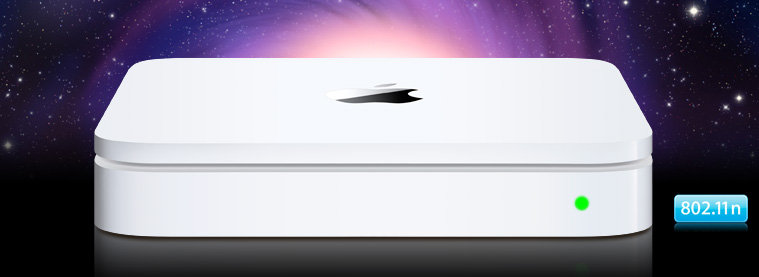
Sometimes I am amazed at how confused I can get over WLAN configurations. What seems so straightforward and plain to me when I am advising someone else will appear convoluted and unknowable when it is my own configuration.
Take for example my own humble home network. Over the years it has evolved from a single Apple Airport (Graphite) Base station and a laptop back in 1999 which I still own to my rather complex hodgepodge of multiple networks I have today.

Today I have 3 networks which I have re-architected many times based on my own changing needs. One for media (music and in the future, Apple TV), one for testing and one for primary wireless access.

The network used only for music (AirTunes is Apple's name for it) consists of one Apple AirPort (Snow) Base Station on my Ethernet LAN and several AirPort Express wireless repeaters scattered liberally throughout my home attached to stereos and speakers here and there. The purpose of these are, as I already mentioned, is to provide me with ubiquitous and simultaneous music. They are all on channel 1 (2.412 gHz) so as to avoid the old Sharp Carousel microwave oven which would normally destroy my listening enjoyment when it is running if the network would use channels 5 to 13 (2.432 - 2.472 gHz). Happily this network has an option set that will not permit Clients (STAs) to attach to it and in fact does not appear on my AirMagnet WiFi analyzer except as actual 802.11 packets. The APs themselves are invisible to network scanners like Netstumbler and others unless you actually do packet analysis. Lastly it is encrypted with WPA2-PSK and is configured for 802.11g only with a 5.5Mb/s muticast rate so the music will play without skips or misses as it streams from my music server.
.

The testing network changes constantly and has AirMagnet Sensors and the Meraki nodes on it. You may have seen some of my previous posts about Meraki's cloud based wireless solutions. Very cool indeed

Now onto the primary network and here is where I got confused. You see, originally this was an 802.11b/g network using that old AirPort (Snow) Base Station. However, as a WLAN engineer I felt it important to have an 02.11n network in place but was worried about interference. This would be both co-channel and adjacent channel interference from other wifi devices as well as non-wifi interference from cordless phones, Bluetooth and my dreaded microwave oven. So I purchase the Airport Extreme Base Station N.This device supported both 802.11a/b/g and Draft N standards, it had Gigabit Ethernet and a port to connect a USB hard drive for NAS. However, I was extremely disappointed to learn that this device would only work on either 5gHz or 2.4gHz not both simultaneously. I wanted both at the same time. C'est la vie. I put the AP in place and started to have issues with the configuration right away. You see, I wanted to use the older Express devices as wirelessly connected repeaters as I had the the other AP but after 2 weeks of trying I could never get them to work so I figured that Apple must want me to upgrade them to the newer N model, however I was reluctant as there was nothing wrong with the ones I had. I chose to live with it the way it was.
Luckily for me Apple introduced a Simultaneous Dual Band version within a few weeks of my purchase and I was able to exchange mine for the newer model. This turned out to cause a new problem when I noticed that it was dropping client occasionally and had to be rebooted once or twice a week. I was perturbed and figured the problem was me or my configuration. I twiddled the settings a few times and changed the firmware but had limited success resolving my issues. I did notice that the Ethernet connectors were always loose no matter how firmly I inserted them but could not positively determine if this was the issue. Also, I suspected my aging ZyXEL DSL router to be a culprit but again could not reproduce the problem to my satisfaction. I just could not believe that it was an Apple product control issue. My internal standard for Apple's Quality control was very high after years and years of experience with their products. Finally, after awhile (2-3 moths) I grew tired of trying to fix it and gave up and just informed my family to reboot the Internet Router and the Airport if they couldn't access the Internet. To quote Julia Child, "This always works."
After a few months and independent from these issues, we decided to invest in a backup solution that was more comprehensive that the piece meal attempts at backup we were doing today. The consensus was to go with Apple's TimeCapsule as I had heard from others on how well it performed. For all intents and purposes it was identical to my current AP but with internal Hard Drive and Power supply so I was a bit trepidatious but gave it the green light. We purchased the product. Configured it in about 15 minutes and replaced the Simultaneous Dual-Band AirPort Extreme N Base Station and low and behold, all my problems went away! I was amazed and decided that 8 hours was not long enough for testing. 2 weeks later it is still going strong. I had found the weak link, or had I?
I repurposed the Slightly older AirPort to my boudoir/office and never had a problem again with either connections. To this day I am at a loss to explain it. Some combination caused the problem, once separated however, the problem disappeared.
You see, sometimes I get confused.
Thursday, October 8, 2009
Why we need (and should already have) a 4 channel plan in 2.4GHz

It took me 2 more years before I realized that the FCC had allocated the channels (in my opinion) incorrectly and that channel 14 was in the wrong place. I just never actually looked deeply enough nor calculated it out enough to catch it. Then one day I did calculate it and said, "hmm".
Lets take a look. Each channel is positioned 5MHz over from it's neighbor and the counting starts at 2.412 (I assume this is so someone doesn't try and put an AP up on 2.400GHz and have the left hand side 10Mhz hang out into the 2.3GHz spectrum.) So channel 1 is 2.412 and channel 2 is 2.417 channel 3 is 2.422 etc. Reference here.
Here this should help:

Notice what happens above channel 13, suddenly it jumps from 2.472 to 2.487. Why? I have no idea. It always remained a mystery to me.
Nowadays, however, we have a very crowded frequency range. Every mother's son has an AP not to mention all the non-802.11 interferers. This makes it hard to find room to breathe. I recently went back to my original spreadsheet and tried to see if we could use some of that real estate up around channel 14.
I was pleasantly surprised to see that if we continue to extend the 5HMz per channel philosophy up all the way to 2.497 GHz we can create channels 14, 15 and 16. This allows us to put an AP on (the newly created) channel 16 at 2.487 that will not overlap with channel 11 and will also not leave the 2.4 range. Nirvana!!
See?:

An interesting byproduct of this would be 2 non-overlapping 40HMz wide 802.11n bands as well. One from 2.402 to 2.447 and another from 2.452 to 2.497.
Unfortunately, I learned while researching this that the FCC will not allow use from 2.4835 GHz to 2.5 GHz. This is probably legacy from outdated military radar or other radios that caused similar restrictions in the UNII bands as well. The regulation may be found here
 Which is really too bad. Funny enough, we found a way around military interference with 802.11h using Dynamic Frequency Selection and transmit power control in the 5GHz band. Why can't we do the same here, we could really use the bandwidth regardless of Voidmstr's Law. What do you think?
Tuesday, June 9, 2009
Disposable Income??

Well here we are, half way through 2009. This year saw the culmination of, arguably, the worst financial crisis since the Great Depression. Yada yada yada. We have heard this all before.
I thought we were going to talk about Wi-Fi?
Well today I thought I would talk about disposable computers. Several weeks ago an associate of mine saw her beloved 17 inch iMac G5 all-in-one start to shut down for no apparent reason. She had Apple Care and had no problem trucking it down to the local Apple Store Genius Bar for a looksie.
They had her Mac for a week and then called and said, "you better come down here". When she got there they broke it to her gently, her mac was dead. The logic board was failing and a replacement would cost more than the worth of the unit. A few tears were shed before she realized this would mean she would need a new iMac - STAT!
The poor old unit sat next to the front door accumulating dust until I stripped some parts off of it and sent the remainder to the recycling plant here in San Francisco where they are used to this kind of recycling, as I am sure they are elsewhere these days.
I felt bad. Seemed like a waste.
Then I did the worst thing a husband can do to a Wife's computer. I spilled a drink on my wife's MacBook. I freaked out, flipped the unit over, yanked out the mag-safe power cable and the battery and spent the next several hours wiping it down and blowing air through the unit to get it dry. I failed, the next morning she had a host of keyboard and restart issues. She was not happy, however, to her credit, she was not super mad at me either, just at the situation.
So, guess what I did? Yep. I took the unit down to the Apple Store, where again the Genius Bar Dude said it was covered by AppleCare and that they would call us in a few days and tell us what was up. And guess what the verdict was? 800 dollars, 100 dollars cheaper than the Brand New Macbook. Worth the investment? Probably not.
Now here is where most folks would start to rail against the new disposable society. Everything from cell phones to TVs are all disposable now. Right? Wrong.
Not me. Why? Well I have a small contribution to make to help stop this madness.
I found two places that were willing, with a little effort, to show me how to take care of these problems myself. No fancy Apple Store Genius, know-it-all, Fixer Upper, dude (BTW, most of the time, they do not even do their own repairs at Apple, they farm it out). It should be mentioned that I am no stranger to this kind of stuff. Awhile back I repaired my first original AirPort Basestation by replacing a burnt out capacitor. Heck, a logic board replacement for the MacBook doesn't even involve soldering
The first site I am sharing is run by a pair of guys who were in college and decided to try and fix their Mac themselves, then they were fixing their pals computers and then, weell, they said, You do it. They started iFixit. Ifixit will sell you the parts and show you how to replace them. This, of course, voids the warranty, but, hey, you were going to throw it out and get a new one anyway, right?
Here is their story in their words
It bugged us that most consumer devices lacked repair instructions. We think it should be easy for people to learn how to fix things.
So we wrote some instructions the first chance we got. And we posted them online, for free. For the first time, it was easy for someone with no technical background or experience to take apart a Mac. Our step-by-step instructions were enabling people to repair Macs they wouldn't have been able to repair on their own.
We thought the instructions would be useful to our customers -- and they were. But it turned out that they were useful to a lot of other people as well! We've heard repair success stories from forensic detectives, field translators, and even kids. From New York to Alaska, Tibet to the Faroe Islands, people have used our guides to fix their stuff. They saved money, they kept their Macs out of the landfill, and they did it completely by themselves.
And the amazing thing? They enjoyed doing it. It's fun to take stuff apart. It's interesting to see what's inside that magic iPod you carry around every day. It's gratifying to fix it with your own hands. Don't believe us? Try it! Fix your Mac yourself. Show a friend how to fix something.
We're all in this thing together, and if we work together we can fix the planet. Join us.
Neat! And they are helping the environment while making a good buck or two in the process. Oh, and not just Macs, Nintendos, Palm Pre's, iPones and iPods, and even bananas
Next up, I found there guys, The Powerbook Medic folks. Theyare similar to iFixit in that they sell parts and show you how to fix stuff. They also will fix it for you (for a reasonable fee) and they also have video tutorials on YouTube


The total cost to fix my Wife's Macbook now looks to be around $250-$350. A far cry from the $800 plus I was quoted to do the same thing by the Apple Store. Don't get me wrong, AppleCare is awesome. It has saved my bottom so many times. Well worth every penny, but aside from that, do we really need to be tossing out so many electronics in this day and age?
So it turns out you do not have to chuck out that pretty awesome Apple MacBook after all. I am sure there are sites for Dell, Toshiba, Gateway, Sony and homegrown BYO (build it yourself) FrankenPuters and others as well. A quick google search shows you that anyone can do this kind of repair.
Oh, now, how I wished I could go back and get that iMac G5.
UPDATE!
We finally got the MacBook back from Apple and now it will not boot. It booted before, just had crazy keyboard shenanigans. Now, Dead.
So now we have to move forward with the plan. I will update as I do it.
Thursday, May 28, 2009
Personal PSKs (Wi-Fi Masterminds)
Thursday, April 23, 2009
Maturation of the WiFi Market

I think we are reaching a stage where people are actually starting to depend on their wifi networks the way they do their wired ones. They expect blanket coverage everywhere. Network Admins are starting to actually trust these networks now as well.
How did I reach this conclusion? Well, I was told this by a very large healthcare organization. This company has over 60 thousand employees and hundreds of locations. I was teaching a class in WLAN management when a couple of router guys chuckled in the back of the room. You see, to them wifi was a part time gig. They managed the core. I would have said something however, I never had to. Another attendee, a real leader in the group, took over and said, "You wired guys want to chuckle but let me tell you, moving forward, wireless networking will be the primary access method for all new connections and applications."
I was stunned as this was a pretty hefty statement to make in front of a vendor (me).
And this is not the only place I heard this. I was recently at the headquarters for a major media company. I mean really major. The WLAN Admin Exec. said almost the exact same thing.
Are we reaching a milestone? I think so. I think mobile devices are pushing this forward. It was all fine and good that companies provide wifi for big ol' laptops but when people have an iPhone in their pocket and are surfing the web non-stop round the clock... Well, let's just say, people can get pretty demanding for something they never had before but are getting used to using everyday.
To illustrate my point, please watch this comedian from the Conan O'Brien show. His name is Louis CK and he is spot on. If you are impatient, tune to 2:16 for the particularly poignant part.
"Everything is amazing and nobody is happy"
Uploaded by Meowbay. - Click for more funny videos.
Thursday, March 26, 2009
Ahh, yes. I remember it well... Last refuge for the lost.
Waaaaayyyy back in the day, right after I moved to NYC I discovered an online social network. This was a social network of fugitives from the law, writers, misfits, artists, rock stars and geeks. I logged in several times a day and was amazed at what I read. Some of it psychadelic and off the wall but most of it compelling and intelligent. As with all social networks, I, the n00b, posted what I thought at the time, were intelligent ideas on computers, politics, civil rights, books, movies and whatever else came into my scheming and much younger head. I argued and I lost. I argued and I won. But mostly I made friends and learned.
Digg It!
I learned how to use Internet tools. I learned how some folks hacked and phreaked. I learned how to get along with those I disagreed with. I learned that many of those ideas I did not like were at least as valid as mine and in many cases these discussions caused me to change my mind. I discovered what I really felt about things by being challenged. It was social. It was lifechanging.
This social network was on the Internet in 1992 however it had no web page - since web browsers had not been invented yet (that would come a year later). In fact, it didn't even have a GUI. just this strange ASCII welcome image:
/\_-\(:::::::::)/\_-\
<((_))  MindVox  ((_))>
\- \/(:::::::::)\- \/
I met some very interesting people there. Like voidmstr, the person who would later be quoted for voidmstr's law, "Bandwidth expands to fit the waste available." Also, reive, galt, leq, dross, evan, sassy, and tomwhore. All names in 8 lowercase characters or less as required at the time. I also met some famous people there, like Billy Idol, Wil Wheaton, Charles Platt and Bruce Sterling. But it was the core users of the bandwidth forum on Mindvox and #mindvox on EFnet that made it for me. Smart people. Inciteful people. I knew them and they knew me even though I only ever saw a small handful of them face to face - once - (at a William Gibson reading in Central Park, no less).
The point I am trying to make here, or more factually, the idea my wife pointed out. Is that it took 17 years for the Internet to realize that social networks are where it is at. Meanwhile, way back in 92' and 93' folks were already aware of this. Mindvox, The Well, Panix. Folks who hung out there, they had social networking down. And the best part was, you networked with folks who, at the begining at least were not friends and acquaintances. It was like a micrcosm of New York City itself. Shoved face to face with a bunch of strangers and forced to deal with them.
I think, all criticisms of the current UI and direction aside, Facebook and others get it all wrong. There is no confrontation with "the other", it is all about you and your homies, your posse, your family. There really is no tolerance for arguement and, like twitter, no space to do it in anyways.
Well, maybe there is a chance to get back to what mindvox had initially. That cowboy, f%#& You!, "Hell's Angel's of the Internet" type of community. How?
In many ways I fear it's return. I fear that all my memories of it's initial incarnation will disappear in an Ibogaine forum haze. Or that, more likely, folks will be too busy with life and work and surfing the Tubes of the The Internets to offer real discussion and input worth reading.
I am hopeful, however. +)=[ dood! ]=(+
Digg It!
Monday, February 9, 2009
How to find a WiFi antenna?
Finding the right Wifi Antenna is a pain in the connector. When I meet with WLAN managers the most often asked question about antennas is, "Where can I get one that is camoflaged or hidden in some way?" Most antenna sales or manufacturers websites are really bad. Either these websites haven't been changed since 1997 or the are broken or just plain unusable.


I get a lot of requests for sources of antennas. Not high gain, site to site antennas. Not parabolic or Backfire. Not a 4 foot long ultra-high gain omni.
All the requests I get are for one simple thing. A disguised antenna. This could be an antenna that looks like a smoke detector, an alarm light, a speaker grill or anything except a wifi antenna. In almost every case the antenna must do 2.4GHz and 5GHz. More recently it also must do 802.11n.
How hard is it. I am pretty good at Google but I have a real hard time finding one. Everytime I look I get pages that look like this:
Now why is that? I searched for "camouflaged WLAN antenna" and I get the above. When what I want is this:
Anyway, here a short list of websites I have fouond for wifi antennas. If you have a better resource, especially for camoflaged antennas, please post a comment.
Subscribe to:
Posts (Atom)